

The Map Editor as it looks like in the menu
The Map Editor was released on 22 August 2010 (V0.63). It's a tool for players to create user-generated maps.
Maps can be made and published to everyone, and will be spawned randomly. At the end of playing an unofficial map, players can vote if they like the map or not. If the popularity vote is below 50% and the map has 100 votes, the map becomes P44 and no longer appears in normal rooms.
The numbers on the top bar indicate:
- Grounds: #/50 means your ground limit. # is the number of grounds you have placed already. You can only place 50 grounds in a map. All grounds count towards this limit, it doesn't matter if they are dynamic or not.
- Objects: #/30 means your object limit. 'Objects' are those that are found in the list of 'Shaman objects' (see left). Dynamic grounds do not count towards this. You may have a maximum of 30 objects in one map.
Related to the topic, the decoration limit is 40 and the maximum map size is 20kB. This is supposedly there to avoid decoration spam.
Creating
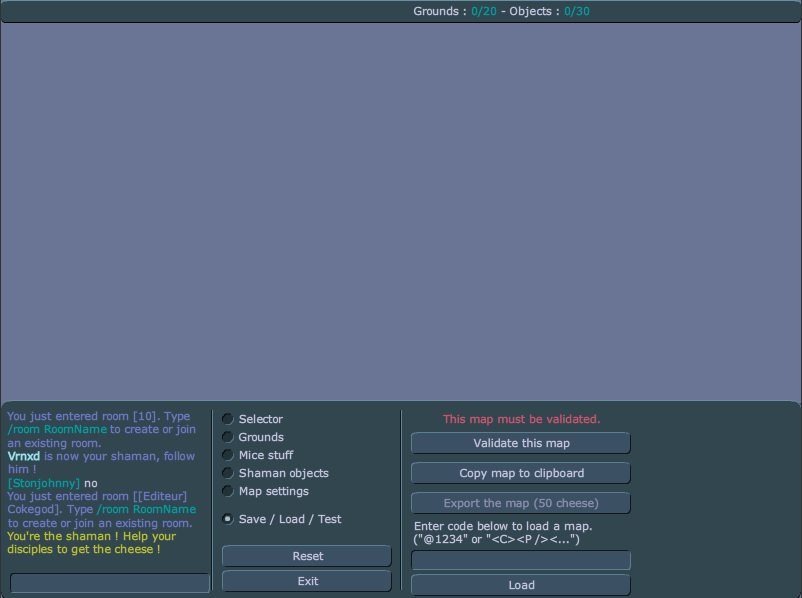

The basic interface
The Map Editor can be accessed by clicking on the menu button and then pressing "Map Editor." This takes the player to a different room from the one they were in—[Editeur] (and player's name next to it). No one besides that person can enter the room.
At the bottom of the editor are 5 categories:
- Selector: When clicked, the player can click on already created objects to change their positions or delete them. While a "ground" or an "object" is selected, the player can change its properties. Everything has the X and Y Location properties.
- For "Grounds", these properties include:
- Length
- Height
- Dynamic Ground (whether or not it is movable while playing the map)
- Mass (The "density" of the ground, most commonly used for weight)
- Friction
- Restitution (Also known as bounciness)
- Rotation (The angle at which the ground is set at the beginning of map play)
- Fixed rotation (Whether or not the ground can be rotated during play)
- Linear Damping (The slowness of a ground in relation to gravity and the mass of the object moving it)
- Angular Damping (The slowness of a ground in rotating).
- For "Shaman Objects", these properties include only Rotation and Ghost Object (whether or not an object is invisible during play and mice can move through it). This does not apply to "Anchors", however, which have no properties other than X and Y Location (along with "Mice Stuff."
- For "Grounds", these properties include:
- Grounds: This allows the player to put ground such as wood, ice, trampoline, lava, or chocolate into the stage. Click and drag to create large pieces of ground. These "preset" grounds have preset settings already. In comparison to wood ground, ice ground has 0 Friction; trampoline ground has 0 Friction and 1.2 Restitution (as opposed to 0.2); lava ground has 0 Friction and 20 Restitution; and chocolate ground has 20 Friction (and 0.2 Restitution).
- Mice stuff: This allows the player to place mouse holes and cheese, and to specify where the shaman and the mice will spawn. On 7 July 2011, a new feature was added. You can now add decorations, like trees, grass and sand elements onto your map.
- Shaman objects: This allows the player to place shaman items and anchors onto the map.
- Map Settings: This allows the player to change the gravity, wind, collision (overlap) mode, soul mate (partner) mode, and portal mode. The night mode setting was removed, but it can be added using map XML editing.
You can use the scroll wheel on your computer mouse to rotate grounds and shaman items. Objects located in the "Mice stuff" tab (decorations, spawns and cheese) are not rotatable.
There is currently a limit of 30 objects per user created map and 50 ground blocks, though this can be exceeded with XML editing. (See below.)
 BugIf Mice Spawn or Shaman Spawn is selected with Selector, it will follow computer's mouse within game area, until player clicks on something else.
You can place shaman items that aren't available in editor menu by copying the map to the clipboard and editing the B value for objects.
Publishing
A map must be validated before it can be published. After pressing "validate map" you will start the map as a shaman, and you must get to the cheese and bring it to the hole to validate your map and prove that your map can be solved. After you have validated it, you may publish your map by exporting it. To publish a map, which costs 40 cheese, you need at least 1,000 gathered cheese on your profile. After it has been exported, it is available for other mice to play and vote on. You will be given a code that will allow you to reload your map to make changes and to see what your map's popularity is. After publishing, a map may get protected, thus reducing the initial cost of map creation to less than 40 cheese.
Voting
User created maps are randomly chosen in game just like the official maps are. After the map is finished only the mice that gathered more than 500 cheese are given the option to vote on the map. Users can see the current number of votes and the current percentage. They may vote yes, no, or don't vote. After a short period of time the voting window is closed. If a user has not voted by this time no vote is counted for them. Voting occurs after the map has finished and before the next map will start. The map will be removed if less than 50% of the users say that they liked it. Ratings do not go into effect until a total of 50 votes have been cast. Maps are not immediately removed once they reach under 50% rating, they are removed with a server restart.
Controversy
Due to the fact voting is open to all mice, who all have their own map preference, some players feel that maps get rated on the difficulty rather than the quality of the map. Some players enjoy easier maps whilst others prefer more of a challenge or more unique maps. This can cause a difference in opinion regarding the voting system.
In an attempt to improve the quality of submitted maps, it was made so a requirement of 1000+ gathered cheese is needed to upload a map as well as the costing 40 cheese.
Grounds
 Main article: Ground
XML editing
Main article: Map XML editingIf you don't know about XML, you can learn more about XML on Wikipedia. In short, XML is comprised of tags and attributes. Tags have 2 different ways they can be written:
- Element tag:
<X>[more tags]</X> - Empty element tag:
<X />
In Transformice, most data for our maps is stored in empty element tags, with element tags primarily being used to hold all the remaining tags.
Attributes go inside the tags like so, with the H being the attribute name and the "data" being the attribute value:
<X H="data" />
The XML of a map can be taken from the Map Editor by going to "Save / Load / Test", and hitting "Copy map to clipboard". From here, you should paste it into a text editor (a popular choice is notepad++). To place XML back into the editor, go to the "Save / Load / Test", and paste it in the text area right above the "load" button, and then hit load.
If you get disconnected while in the map editor, the XML will be in the disconnection message.
Techniques
Main article: Map Editor techniquesBackgrounds
Main article: BackgroundDecorations
Main article: DecorationHistory
- 22 August 2010 (V0.63) - Map Editor is out!
- 22 August 2010 (V0.66) - Maps now cost 20 cheese to export to the server.
- 27 August 2010 (V0.67) - Maps now cost 50 cheese to export to the server. Night mode, soulmate, collision, ghosting shaman items, gravity and wind added. Disabled the ability to use map XML editing to add items not normally allowed in Map Editor.
- 1 September 2010 (V0.72) – Maps now cost 20 cheese to export to the server.
- 2 October 2010 (V0.104) - You now need 1,000 cheese gathered in total before you can export maps.
- 1 November 2010 (V0.115) - Maps now cost 40 cheese to export to the server.
- 5 December 2010 (V0.120) - You can now add more grounds.
- 2 January 2011 (V0.129) - Z-ordering now appears in the editor. Use the + and - icons to move the object further into the foreground or background. Hold down the Space and click and drag to move the map. Press Esc to center the map.
- 22 January 2011 (V0.134) - You can load map code of deleted map, which weren't deleted before this update.
- 23 January 2011 (V0.135) - Code of Permanent map can be loaded. And display message about permed.
- 7 June 2011 (V0.158) - You can now add decorations, backgrounds and new grounds (earth, grass, sand, cloud and water).
- 13 June 2011 (V0.160) - Maximum ground length limit raised from 1,400 to 3,000. Grounds longer than 1,400 will appear plain green to reduce lag.
- 23 September 2011 (V1.7) - Tribe House maps added.
- 18 October 2011 (V1.666) - You can now duplicate objects (press D), and put grounds on the foreground.
- 16 December 2011 (V1.21) - New grounds (stone and snow).
- 27 January 2012 (V1.25) - Editing your exported maps is now free.
- 7 February 2012 (V1.26) - The ground limit is now 50 (it was 40 before). Every time a player gets a new permanent map (from P1 to P9), the map creation will cost less cheese:
- 1 permanent map → Map creation now costs 30 cheese.
- 2 permanent maps → Map creation now costs 20 cheese.
- 3 permanent maps → Map creation now costs 10 cheese.
- 4 and more permanent maps → Map creation now costs 5 cheese.
- 8 February 2012 (V1.27) - Having one P1 will now lower the price by four cheese. The map editor will now show the real map exportation cost.
- 12 March 2012 (V1.29) - New options for how grounds interact with other game objects. Instead of the border, the entire ground glows when selected.
- 14 March 2012 (V1.30) - New grounds (rectangle and circle). Portal setting added.
- 15 March 2012 (V1.31) - You can now use Ctrl+Z to undo the last action. You can now use Ctrl+Y to redo a previous action that you've chosen to undo. You can use Ctrl+Z and Ctrl+Y for the last 100 actions. You can now correctly add a cheese/hole in the foreground.
- 28 March 2012 (V1.33) - Color picker for grounds added. Black borders on selected grounds added.
- 7 November 2013 - Tribe House maps (P22) now cost 5 cheese to make.
- 17 December 2013 (V1.131) - Press M to summon a mouse (⇧ Shift+M to summon a mouse with a cheese on its back).
- 22 April 2014 (V1.145a) - You can now use the shortcut ⇧ Shift+A to select all the grounds.
- 2 September 2014 (V1.185) - Checkpoints can be added to bootcamp maps.
- 14 April 2015 (V1.238) - Objects like runes and small planks are now displayed. The new backgrounds via XML are now visible while editing; they used to be visible only during validation.
- 29 July 2015 (V1.258) - You can now list your own maps with the /lsmap command. From now in the XML, the front images have the same syntax as the back ones.
- 29 December 2015 (V1.276) - Added "nosync" xml attributes for dynamic floors and shaman objects to prevent them from being synchronized.
- 17 October 2019 - Dodue cheese added.
- 22 October 2020 (V1.600) - Acid ground added.
- 12 August 2021 (V1.653) - Shaman items available can be changed via XML.
- 27 January 2022 (V1.684) - Snowing disabled.
- 24 February 2022 (V1.688) - The /mort command now works at any time.
- 7 April 2022 (V1.695) - Decorations are now sorted: Transformice, Sea, House, Autumn, Winter, Spring, Valentine's day, and Various.
- 2 June 2022 (V1.704) - Conjuration mode can be added via XML.
- 31 August 2023 (V1.775) - Honey ground added.
- 30 November 2023 (V1.789) - The ground limit increased from 50 to 60, the shaman object limit increased from 30 to 40, and the decoration limit increased from 40 to 50.
- 17 October 2024 (V1.838) - For night mode, the light diameter and who is affected by it (everyone, only the shaman, or everyone except the shaman) can be changed via XML.
- 1 May 2025 (V1.866) - Galaxy ground added.
See also
External links
- Miceditor
- Unofficial map editor tools
- Transformice MapPad – a powerful external Map Editor
- Viprin's drawing editor (useful for art maps)
- Map Editor Q&A on the Atelier 801 forum
- Lua script that tells you the XML of any map