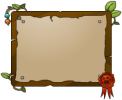
A large signboard
The indicator, sometimes called sign, is a special shaman "action" which can be done by pressing F. Once pressed, a circle of icons appears at your current mouse position, and upon hovering over them a signboard with a message appears in the middle of the circle (but faded out). upon clicking an icon, the circles disappear, and a fully opaque signboard is placed for all mice to see. It will remain until you place another indicator. Moving does not close the interact; to close it, either select an icon or press F again.
It can be summoned anywhere on the screen, regardless of range.
Indicators were introduced on 11 March 2015 (V1.229) as part of Shaman 2015.
List of indicators
There are 7 icons, each which shows a preset message on-screen. Mousing over the icons will cause you to see the effect.
| Icon | Text |
|---|---|
|
Get ready! |

|
I have no idea what I'm doing. |

|
Stay here! |

|
Follow me! |

|
Go there! |

|
Work in progress. |

|
Keep calm and trust the Shaman. |
Gallery

| Shaman | |||||||||||
|---|---|---|---|---|---|---|---|---|---|---|---|
| Modes | |||||||||||
| Items | |||||||||||
| |||||||||||


