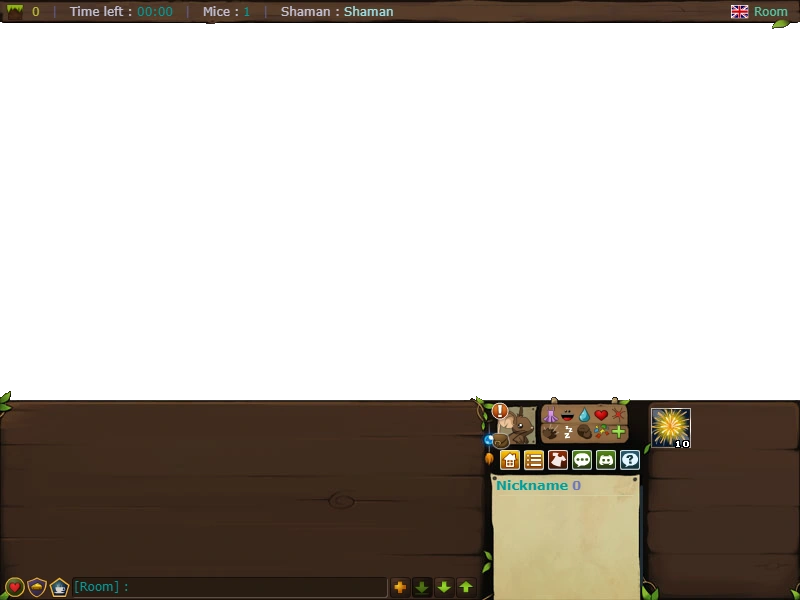
In the game of Transformice, the user is presented with a large graphical user interface that has a variety of functions.

|

|

|

|

|

|

|
| ||||||||||||||

|

|

|

|

| |||||||||||||||||
| |||||||||||||||||||||
| |||||||||||||||||||||


Information bar

A typical information bar at the top of a room
The information bar is positioned at the top of the room and informs you of:
- the current map's #, and creator (if user-made)
- the time left to complete the map
- the number of mice in the room
- who the current shaman is
- which room you are in
Time left is useful in maps that have something happen at specific times, e.g. in map 81, the time counter helps the mice and the shaman because after 10 seconds, the gravity reverses. This gives the mice and the shaman the knowledge of when the gravity will be reversed and how much time they have left to build a shelter or die.
Bottom bar
The bottom bar houses a number of other features, listed below.
Chat box
 Main article: Chat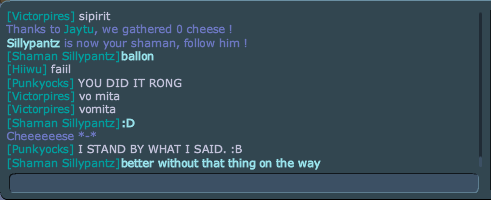
A typical conversation in a random room
The chat box is the most active part of the bottom bar. Not only can registered players communicate with each other in this window, but it also displays various game information.
Chat box buttons



Player list
- “Points” redirects here. For experience points, see Experience.
- “Points” redirects here. For skill points, see Skill.
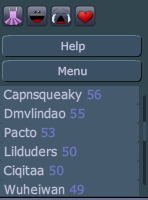
(outdated)
Next to the chat box, you'll find a list of people currently playing in your room as well as their current overall scores.
Generally speaking, the people at the top of the list will be next to be the shaman, but there are occasions where people continue to gain points without becoming the shaman. It also seems random whether or not the next map will have two shaman or not regardless of how close the top scores are.
A table of how many points mice gain after each round can be found here. The shaman can't earn more than 25 points at the end of a round.
Leaderboard
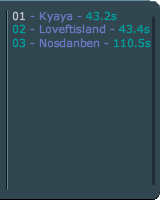
A common leaderboard (outdated)
The leaderboard shows the order the mice that completed the level (obtaining the cheese and proceeded to the hole) finished in and which places they had been in. It is similar to the now removed ranking tab.
Button dialogs
As mentioned above, there are also buttons above the player list. These buttons do a number of things.
Feather
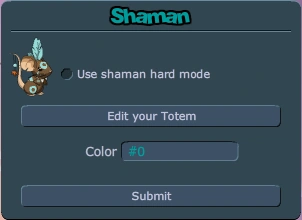
Old version of the dialog box



By clicking the shaman feather to the right of the emote buttons, a dialog box opens, allowing you to turn hard mode or divine mode on/off, enable/disable skills (no-skill mode), set your shaman markings color and configure your totem. This feature is only available to players that have over 1,000 saves.
Buttons
 Menu
Menu Room list
 Shop
Shop Hall of Cheese
 Discord (opens https://discord.gg/transformice)
 Help (opens http://www.transformice.com/tutorials/index.php)
 Fullscreen (replaces the help button on older accounts)





Menu
The Menu button opens up into a number of options.
| Name | Description | Guest |
|---|---|---|
| Menu | Displays clickable images leading to tutorial, vanilla, survivor, tribe house, bootcamp, racing, shop and map editor. | 
|
| Options | Displays options. |
|
| Shop | You can purchase cute items for your mouse in this window such as hats, furs, or even shaman item skins. |
|
| Skills | Lets you distribute skill points and see your level and experience. | 
|
| Forum | Opens the Atelier 801 forum. |
|
| Map Editor | The Map Editor is a feature that lets you create your own map. |
|
| Training | Changes to room "Training [nickname]".
|
|
| What's new? | Shows a list of recent updates. |
|
| Game Rules | Shows a shortened list of the rules. |
|
| Community | Shows a list of community-made resources. |
|
| Email and password | Lets you validate your email or change your password. |
|
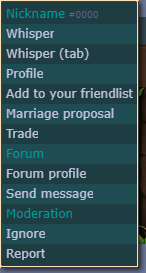
Clicking on a player's name (if it is not the player's own name), either in the player list or the chatbox, makes a menu appear with several options:
| Option | Equivalent chat command (with nickname included) |
Notes |
|---|---|---|
[Nickname]
| ||
| Whisper | /c or /w | |
| Whisper (tab) | /c* or /w* | |
| Profile | /profile | |
| Add to your friendlist / Remove from your friendlist | /friend | |
| Marriage proposal / Divorce | ∅ | |
| Trade | /trade | Trading only works if both players are in the same room (if not, this option does not appear, as well) |
| Forum | ||
| Forum profile | ∅ | |
| Send message | ∅ | |
| Tribe | ||
| Invite | ||
| Moderation | ||
| Ignore | /ignore | |
| Report | /report | |
Trade
- “Trade” redirects here. For the module, see Trade (module).
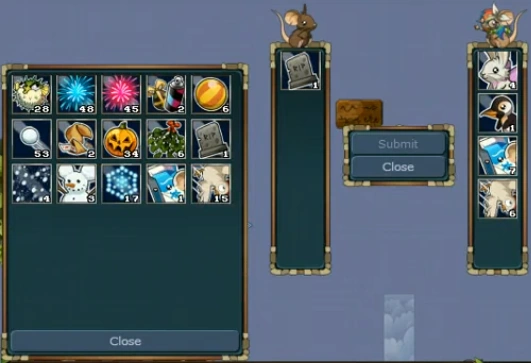
The trading interface
Players can trade by using the chat command "/trade" followed by the nickname, or by using the "Trade" option in the player menu, which appears after clicking on a player's name, either in the player list or the chatbox.
Trading only works if both players are in the same room; if not, the option to trade does not appear in the player menu, as well.
On the trading interface, consumables can be selected to trade by clicking on them. Holding ⇧ Shift while doing so selects 10 of the same item, or if the player does not have at least 10, then all of them.
To prevent abuse, after an item has been selected for, or deselected from, trading, the "Submit" button to finish the trade is greyed out and does not function for a few seconds.
A player's that has clicked "Submit" box turns green; both players must click "Submit" to finish the trade. If either player selects or deselects an item, the player's that has already clicked "Submit" submission will be undone.
Report
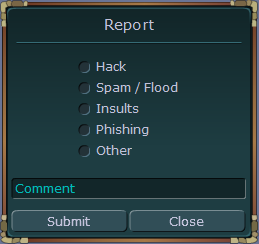
The reporting interface
Players can report others by using the chat command "/report" followed by the nickname, or by using the "Report" option in the player menu, which appears after clicking on a player's name, either in the player list or the chatbox.
Reasons for reporting that can be chosen:
- Hack
- Spam / Flood
- Insults / Obscenity
- Phishing
- Other
A comment can also be added.
There is a system called karma, which keeps track of how many reports of a player have resulted in a ban.
History
- From 28 February 2011 to ?, there was a bubble
 near the chat bar that when clicked showed all the supported fonts on your device, and you could select the one you wanted and the size.
 - The report system was added on 14 September 2012 (V1.50a).
- Trading was added on 9 July 2014 (V1.177). On 21 July 2014 (V1.179), a 1 second trade button deactivation was added after each change because scammers would remove their consumable from the trade right before the other player clicked submit. It was increased to 3 seconds in December 2014.
- On 21 July 2014 (V1.179), the leaderboard wasn't limited to 14 entries anymore. You could now scroll down it to see everyone.
- On 23 August 2014 (V1.183), the user interface was updated. Image buttons replaced the text buttons above the player list.
- On 12 December 2014 (V1.212, the room list interface was added.
- On 17 February 2015 (V1.225), the chat interface was updated. The number of unread messages appears next to each tab. Scrolling buttons are on the right. The friend list and tribe buttons are no longer in the menu, they are now at the bottom left.
- From 7 January 2016 (V1.277b), you can report players not in the same room as you.
- From 22 March 2016 (V1.296b), the trade window automatically closes when a new round begins.
- From 15 November 2016 (V1.339), it is no longer possible to buy consumables when you already have the maximum quantity.
- From 18 August 2020 (V1.585a), you can now report a whisper from a player even if you're not in the same room.
- From 28 January 2021 (V1.618), there is now a chat notification for you when someone tries to trade with you while you're already in a trade.
- On 4 March 2021 (V1.627), "Game Rules" was added to the menu.
- On 12 March 2021 (V1.629), the "Create a room" interface was added. The "Maximum number of players" option was added on 7 April 2022 (V1.695).
- On 18 March 2021 (V1.630), "More Cheese" referral option was removed from the menu.
- On 17 June 2021 (V1.644), "What's new?" was added to the menu.
- On 1 July 2021 (V1.646), the color of the first player and your own name on the leaderboard was changed.
- On 8 July 2021 (V1.647), "Community" was added to the menu.
- Transformice Wiki - added on 8 July 2021 (V1.647)
- Cheeseformice - added on 23 July 2021 (V1.649), removed on 18 August 2022 (V1.716)
- TFM Records - added on 5 January 2023 (V1.739)
- Area 801 - added to PT-BR on 26 August 2021 (V1.655)
- Tutorials and Updates - added to EN on 16 June 2022 (V1.707)
- From 9 December 2021 (V1.675), during VS events, a counter appears above the player list showing the number of cheese gathered by players wearing each fur.
- On 10 February 2022 (V1.686), the name of the reported player is now displayed in the report interface.
- From 3 March 2022 (V1.689), the remaining time turns red when less than 10 seconds remain. Trade requests are now made in the chat.
- From 10 March 2022 (V1.690), players' names in the leaderboard are now clickable. Added colors for trade requests in chat.
- On 28 April 2022 (V1.697), the 3 2 1 GO! countdown was given different colors:


 .
. - On 12 May 2022 (V1.700), the Hall of Cheese button replaced the forum button. "Forum" was added to the menu.
- On 16 June 2022 (V1.707), Map Editor moved from below Shop to below Forum in the menu.
- On 27 April 2023 (V1.756),
 was moved to
  and replaced by .
 - From 6 July 2023 (V1.767), there is now a chat notification for you when a consumable isn't ready for use:
- You must wait for a player to finish the map before using this item.
- You must wait %1 seconds before using this item.







Gallery


