The sync player (synchronizer) is the player whom Transformice servers use as a reference to update the current state of objects and mice present in the room being played to all the other players.
Moderators can change the sync.
How the sync works
Game objects such as shaman items should be on the same spot on the screen for every player. This is necessary to enable the same gameplay experience for everybody. Therefore one player is chosen (people usually call this player the sync) to keep track of all objects' positions and velocities throughout the current round. This means that this player's game recognizes players interacting with those objects (for example pushing a box around). All objects' positions and velocities are sent every 500ms from this player to all other players in the room. For this player all objects move smoothly around, without lagging. For all other players the objects "jump" into their new position and velocities once they received the updated information from the sync.
Why the sync is needed
Players have lag (depending on their ping). If the game would not synchronize the objects every 500ms among all players, the objects would be at different positions for each player, resulting in a different gameplay experience for everybody. For example player A would see a box close to a high ledge so they can jump from the box to the ledge, but for player B the box is still far away from the ledge so they cannot jump there. This would be unfair and chaotic. The sync is taking care that the box is at the same position for everybody. Since the objects are updated only every 500ms and the sync player might have a bad internet connection the objects can still lag, there is no way to solve this problem.
How the sync is chosen
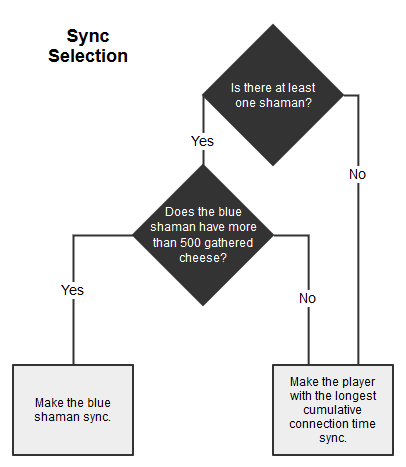
Longest cumulative connection time is not the connection time of your current session. It is also not the time since you made your account. It is the time that your profile has been connected to the server in total. Imagine you have a stopwatch that you start when you first log in to the game. If you log out you pause the stopwatch. When you log in again, you start the stopwatch and it keeps going from the time when you logged out. This time is the cumulative connection time. You can check your own cumulative connection time by writing /time into the chat. The flowchart says blue shaman because of the possibility of double shaman maps.[1]
Tribe chat commands
The tribe chat commands "/sy" and "/sy?" are available to tribe members that are able to load maps.
- "/sy
[username]" sets who is the sync player. Using an invalid username resets the sync player to the default one set by the server. - "/sy?" displays in the chat the username of the current sync player.
List of known bad-sync issues
- Gravity not working properly, such as objects not ascending on water. Formerly this caused balloons to not rise.
- Totem spawn delay.
- Objects suddenly changing position. (Such as building planks making mice fall.)
- The sync player usually can't get out of closed car maps.
- If the sync player goes into the hole, the totem's nails will not spawn.
Trivia
- Since 12 December 2013 (V1.131), cannonballs aren't synchronized anymore to avoid any cannonball teleportation. Their positions may be slightly different for some players.
References
- ↑
 Epoki #0095 (9 April 2015 [GMT]). "Questions & Answers", post #3623. Atelier 801 forums.

